


RX Editor Selector tool mode
2026. 05. 25.·SoundFlowMUZIUM
다른 언어:
한국어·English
RX Editor Selector tool mode
Pro tools 에서는 마우스 커서 모드를 [~] 단축키를 통해 4개의 모드를 번갈아가면서 사용할 수 있습니다.
그러나 iZotope RX Editor에서는 여러 커서 모드가 있음에도, 각각 독립적인 단축키를 가지고 있어서 자연스러운 전환이 어렵습니다.
단일화된 작업환경을 만들기 위해 해당 마우스 커서 모드 (RX에서는 Selector Tools)에 임의의 단축키를 지정 혹은 기존 단축키를 통해, 하나의 키에서 여러 모드를 전환할 수 있게 스크립트를 만들었습니다.
해당 스크립트를 Soundflow에서 동일한 단축키에 배정하면 Protools과 동일한 형태로 마우스 커서 모드 (Selector Tools) 전환을 할 수 있습니다.
사전 작업
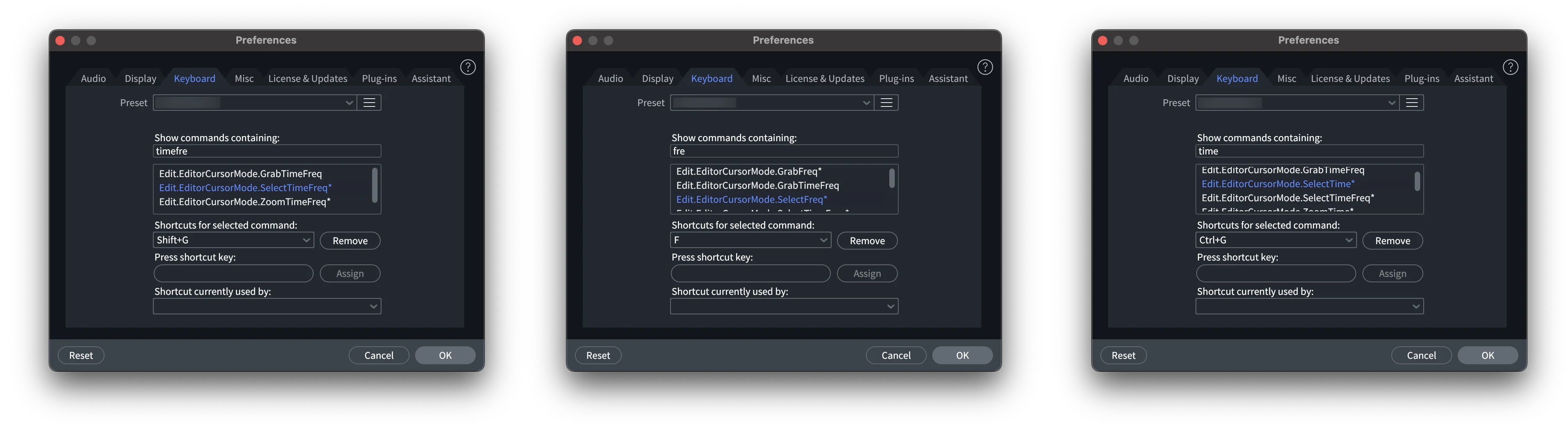
iZotope RX Editor 에서 먼저 단축키 설정이 필요합니다.
iZotope RX Editor 제작자들은 단축키나 표기에 대한 존중이 없는 사람들이기 때문에 단축키 시스템을 매우 불편하게 만들어두었습니다.
해당 Selector tools 혹은 원하시는 tools을 선택하고 단축키를 설정해두면 됩니다.
스크립트 (Soundflow, Js)
/*
 * MUZIUM SoundFlow Script
 * Website: https://muzium.kr
 * Contact: public@muzium.kr
 * Created by EMU with Codex and Claude.
 * You are free to edit, duplicate, and distribute this script.
 */

// Initialize the saved tool state the first time this script runs.
if (typeof globalState.muziumRxSelectToolCycleIndex === "undefined") {
    globalState.muziumRxSelectToolCycleIndex = 0;
}

// Cycle through the three RX tool shortcuts: 0 -> 1 -> 2 -> 0.
globalState.muziumRxSelectToolCycleIndex = (globalState.muziumRxSelectToolCycleIndex + 1) % 3;

// Send the shortcut that matches the current tool state.
if (globalState.muziumRxSelectToolCycleIndex === 0) {
    sf.keyboard.press({
        keys: "control+g",
    });
} else if (globalState.muziumRxSelectToolCycleIndex === 1) {
    sf.keyboard.press({
        keys: "shift+g",
    });
} else if (globalState.muziumRxSelectToolCycleIndex === 2) {
    sf.keyboard.press({
        keys: "f",
    });
}
현재 3개의 커서 모드를 넣어두었지만, 상용자 취향에 따라 단축키나 state를 추가하면 원하는 만큼 키의 사이클을 돌리고 설정할 수 있습니다.
아래의 코드에서 주석과 함께 보시면 됩니다.
/*
 * MUZIUM SoundFlow Script
 * Website: https://muzium.kr
 * Contact: public@muzium.kr
 * Created by EMU with Codex and Claude.
 * You are free to edit, duplicate, and distribute this script.
 */

// Initialize the saved tool state the first time this script runs.
// This value stores the current position in the shortcut cycle.
// It starts at 0 the first time the script runs, then SoundFlow keeps reusing
// the last saved position on later runs.
if (typeof globalState.muziumRxSelectToolCycleIndex === "undefined") {
    globalState.muziumRxSelectToolCycleIndex = 0;
}

// Cycle through the three RX tool shortcuts: 0 -> 1 -> 2 -> 0.
// To add more shortcuts to the cycle, change the number after "%" to the total
// number of shortcuts. For example, for four shortcuts, change "% 3" to "% 4",
// then add one more "else if" block below for cycle index 3.
globalState.muziumRxSelectToolCycleIndex = (globalState.muziumRxSelectToolCycleIndex + 1) % 3;

// Send the shortcut that matches the current tool state.
// To change the shortcuts without changing the cycle length, edit only the
// "keys" values inside sf.keyboard.press().
// Example: replace "control+g" with "command+1" or any other SoundFlow key combo.
if (globalState.muziumRxSelectToolCycleIndex === 0) {
    sf.keyboard.press({
        // Shortcut sent on cycle position 0.
        keys: "control+g",
    });
} else if (globalState.muziumRxSelectToolCycleIndex === 1) {
    sf.keyboard.press({
        // Shortcut sent on cycle position 1.
        keys: "shift+g",
    });
} else if (globalState.muziumRxSelectToolCycleIndex === 2) {
    sf.keyboard.press({
        // Shortcut sent on cycle position 2.
        keys: "f",
    });
}

// Example for adding a fourth shortcut:
// 1. Change "% 3" above to "% 4".
// 2. Add another branch to the if/else chain above:
//
// } else if (globalState.muziumRxSelectToolCycleIndex === 3) {
//     sf.keyboard.press({
//         keys: "your+shortcut",
//     });
// }
검증 환경
검증 환경
| OS | macOS 15.7.5 |
|---|
도구 버전
| Soundflow | v6.2.0 |
|---|---|
| App | iZotope RX 11 Audio Editor |