

Why I Switched from WordPress to a Custom-Built Website
2025.12.12·Vibe Coding·9 min readMUZIUM
#wordpress#custom website development#wordpress speed optimization#vibe coding#ai coding#website optimization#hosting cost reduction
Also available in:
English···

Does your website open within seconds of a customer clicking on it? If it takes more than 3 seconds, chances are 50% of your potential customers have already hit the back button. In particular, a website's performance — its technology, design, and sound — directly reflects the company's technical capabilities.
Many people choose WordPress when building a website. But as you operate it, you inevitably grow tired of the ever-expanding plugins, sluggish loading speeds, and monthly hosting fees. I was no different. So I made a decision: ditch WordPress and build everything from scratch.
This is a record of how a non-professional developer built a website entirely in-house using Vibe Coding — a method of coding by conversing with AI. I'll share how it was possible to create a high-performance website without technical knowledge, along with the concrete numbers behind the cost savings and speed improvements gained through the process.
1. The Pros and Cons of WordPress
WordPress is a powerful CMS that powers more than 40% of websites worldwide. However, the advantage of being able to "do everything" paradoxically becomes a critical drawback: "whatever you do, it's heavy." Because it exists to do anything and everything, there are simply too many scripts that need to be loaded by default.
The biggest issue was "Plugin Dependency." When you install a plugin to add an audio player feature, that plugin loads all sorts of unnecessary CSS and JavaScript files along with it. To make even minor design tweaks, you need a page builder (WP Bakery, Elementor, etc.), which causes site speed to drop exponentially. It's like firing up a massive truck just to ride a bicycle to the local grocery store.
The cost issue can't be ignored either. The heavier WordPress gets, the more expensive the hosting server you need to support it. To prevent the site from going down when traffic spikes — or simply due to CPU and memory issues — we had to spend fixed costs ranging from tens of thousands to hundreds of thousands of Korean won per month. "Building an in-house website" was not merely a technical challenge; it was an essential choice for the survival of the business.
💡 Pro Tip: If you're curious about the speed of your current WordPress site, run it through 'PageSpeed Insights'. If you see a lot of orange and red flags, it's time to start with some basic system improvements, put your plugins on a diet, or consider migrating to a different platform.
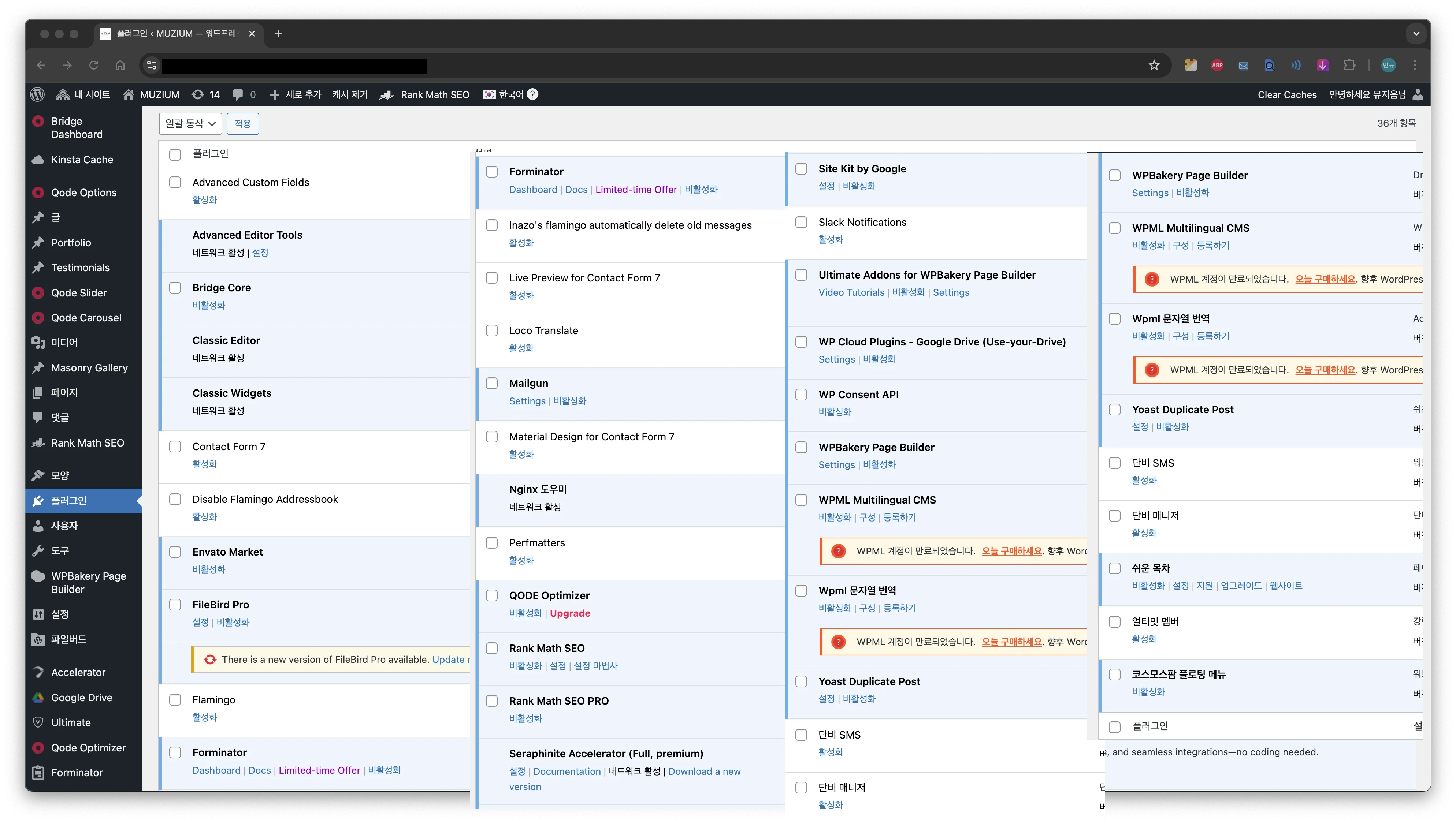
I thought installing just a handful of plugins would be fine, but an enormous number of plugins ended up being installed in order to achieve the ideal theme, structure, and functionality.
2. Vibe Coding
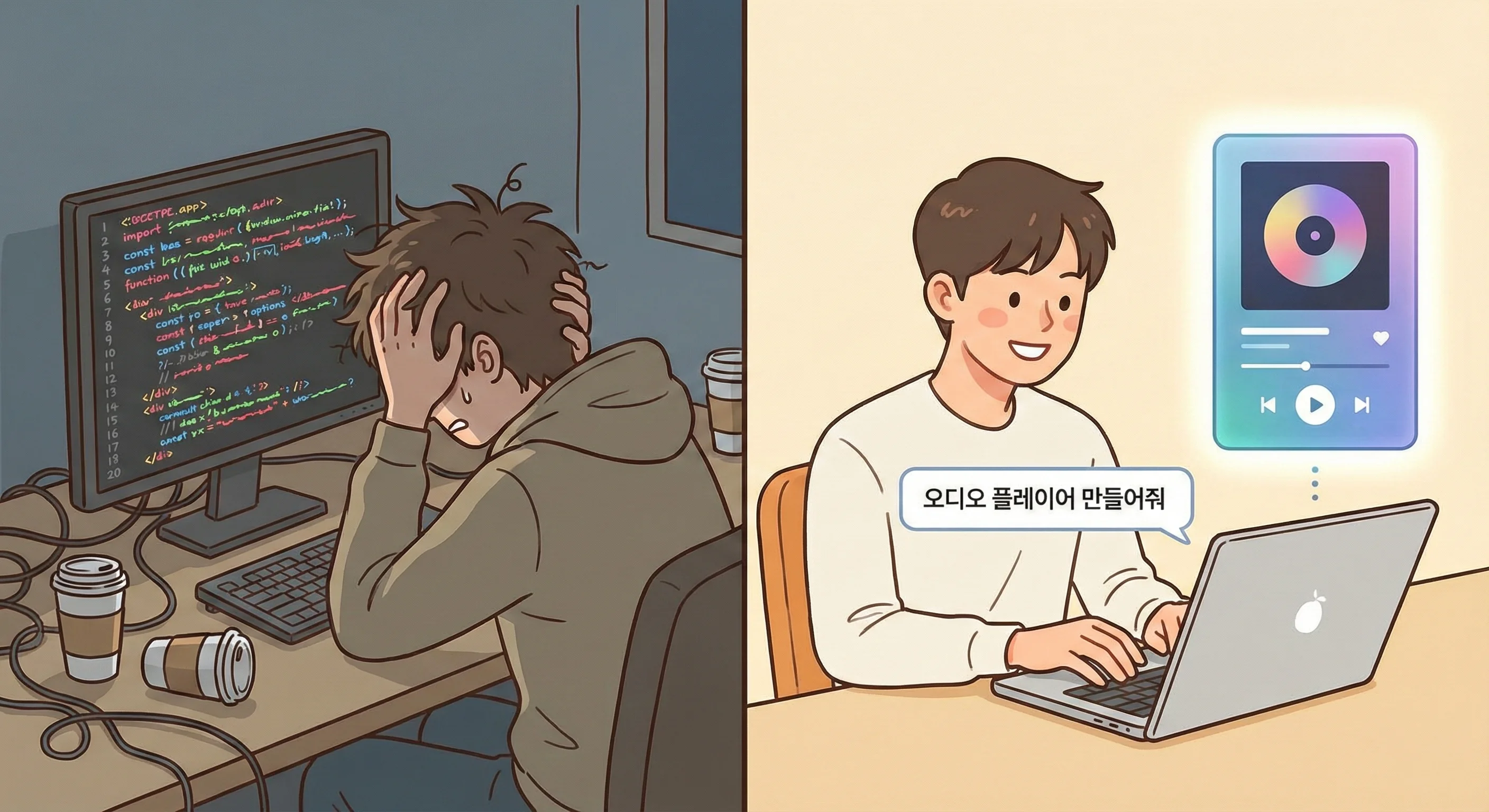
When people hear "in-house development," they tend to picture white text on a black screen and feel intimidated. But with the rise of Vibe Coding, the game has changed. Vibe Coding is not about memorizing strict syntax to write code — it's a method where you describe your intent to an AI in natural language (the "vibe"), and then assemble the code the AI writes to create the final product.
We worked in VS Code alongside Claude. My job was simply to give clear instructions like, "Make the header turn semi-transparent when scrolling, and pin the audio player to the bottom." Features that once required an understanding of JavaScript's asynchronous processing or CSS layout structures can now be implemented with nothing more than a clear plan, an idea, and the right questions.
This approach goes beyond simply copying and pasting code — the AI proposes the overall project architecture. Even the "responsive audio waveform visualization" feature needed for a sound studio required no digging through library documentation. Just asking the AI, "Show me the waveform using WaveSurfer.js," and the basic code was ready in no time. Where the barrier of technology once stood, the creativity of planning has taken its place.
3. Structural Design: The Less You Load, the Faster It Goes (Website Optimization)
When we left WordPress and started building in-house, the first principle we established was "optimizing for user experience and performance." We stripped away WordPress's heavy themes and plugin dependencies and adopted a modern web architecture based on Next.js 16 and NestJS. Rather than simply creating a lightweight site, we actively leveraged React Server Components and Redis caching to dramatically improve loading speeds while building a solid system that doesn't sacrifice the dynamic features we need.
With greater development freedom, SEO (search engine optimization) and structural efficiency were also maximized. In the WordPress environment, it was difficult to fully control the unnecessary scripts and styles forced upon us by themes and plugins. Through in-house development, we designed the site so that only the code strictly necessary for each page is loaded, and placed semantic tags in exactly the right spots — completing a solid structure that allows search engines to clearly understand the site.
Resource optimization for images and fonts also became far more refined. We eliminated the meaningless auto-generated thumbnails and bloated code that WordPress produced, and applied the latest image format, WebP, using Next.js's built-in features. We also revised the font loading strategy to minimize render-blocking resources, addressing initial load times. The entire process was the result of relentless thinking not about "what can we add?" but "what can we take away?"
4. Hosting Cost Reduction: From ₩160,000 to ₩60,000 per Month
Another achievement of in-house development was the rationalization of hosting costs. In the previous WordPress environment, we had to use an excessively expensive, high-spec hosting service to handle the heavy processing demands of PHP and the database — far beyond what our actual traffic or content volume required. The cost we were reluctantly paying to prevent performance degradation was around ₩160,000 per month, which was a clear inefficiency from a business standpoint.
We have since migrated our infrastructure to AWS Lightsail, bringing costs down to around ₩60,000. Lightsail has relatively lower specs compared to high-performance EC2 instances, but thanks to our lean, optimized architecture, the current setup delivers more than enough performance. This is because the site runs efficiently on well-written code, not by relying on raw hardware power. By integrating Cloudflare's free plan to further strengthen security and global caching (CDN), we achieved a reduction in costs of over 60% while actually improving both stability and speed.
💡 Pro Tip: 'Contact Form 7,' an essential WordPress plugin, is also a notorious culprit that loads scripts on every page and slows down your site. If you've built your own backend (NestJS), you can fully implement email sending functionality with a simple API integration. Without depending on unnecessary external services or plugins, you end up with a lightweight and secure inquiry system where you directly control everything from spam filtering to data processing.
5. Performance Comparison (Lighthouse)
The first thing we did after completing development was measure the Google Lighthouse score. The results were striking.
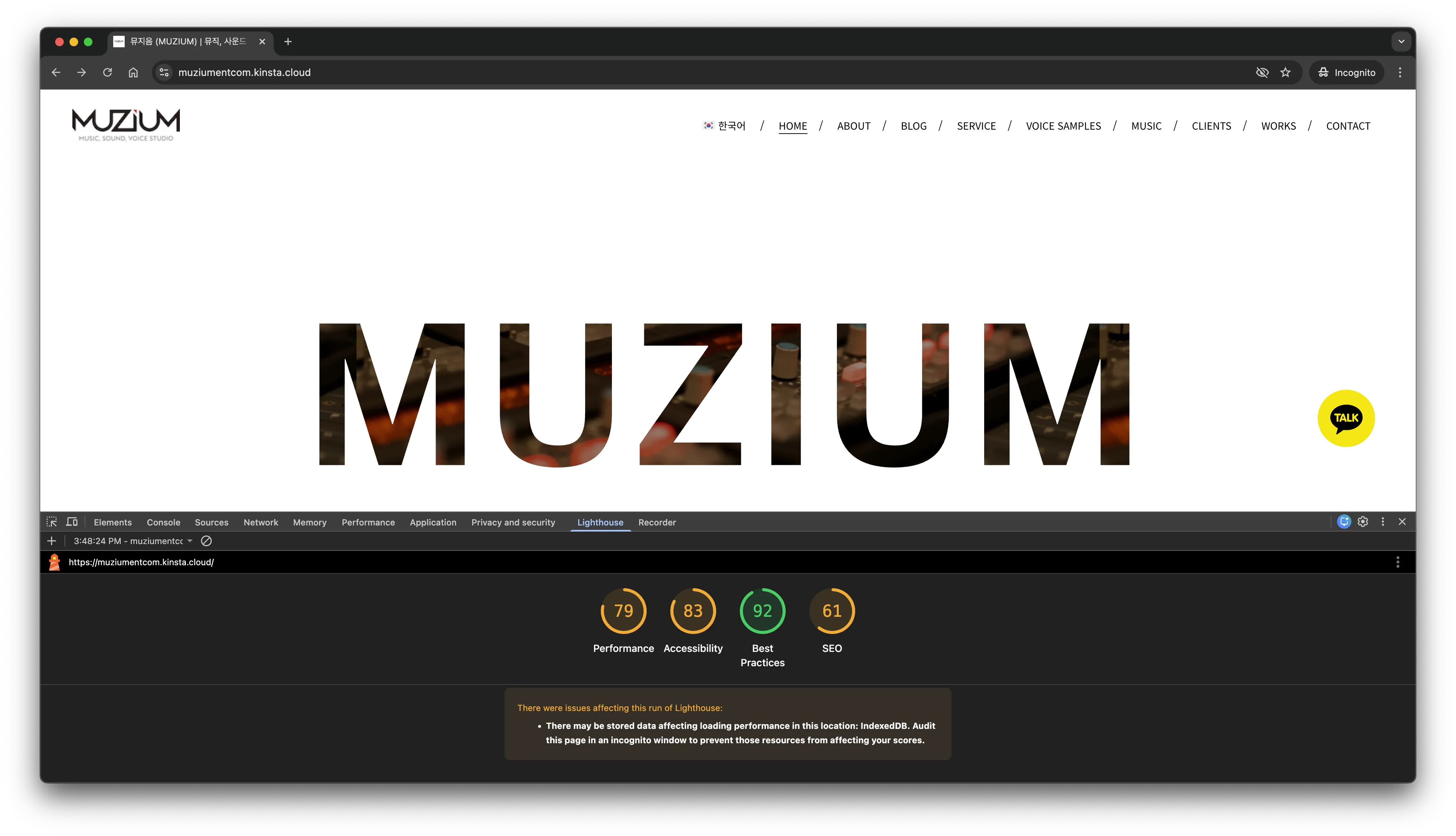
WordPress: 80+
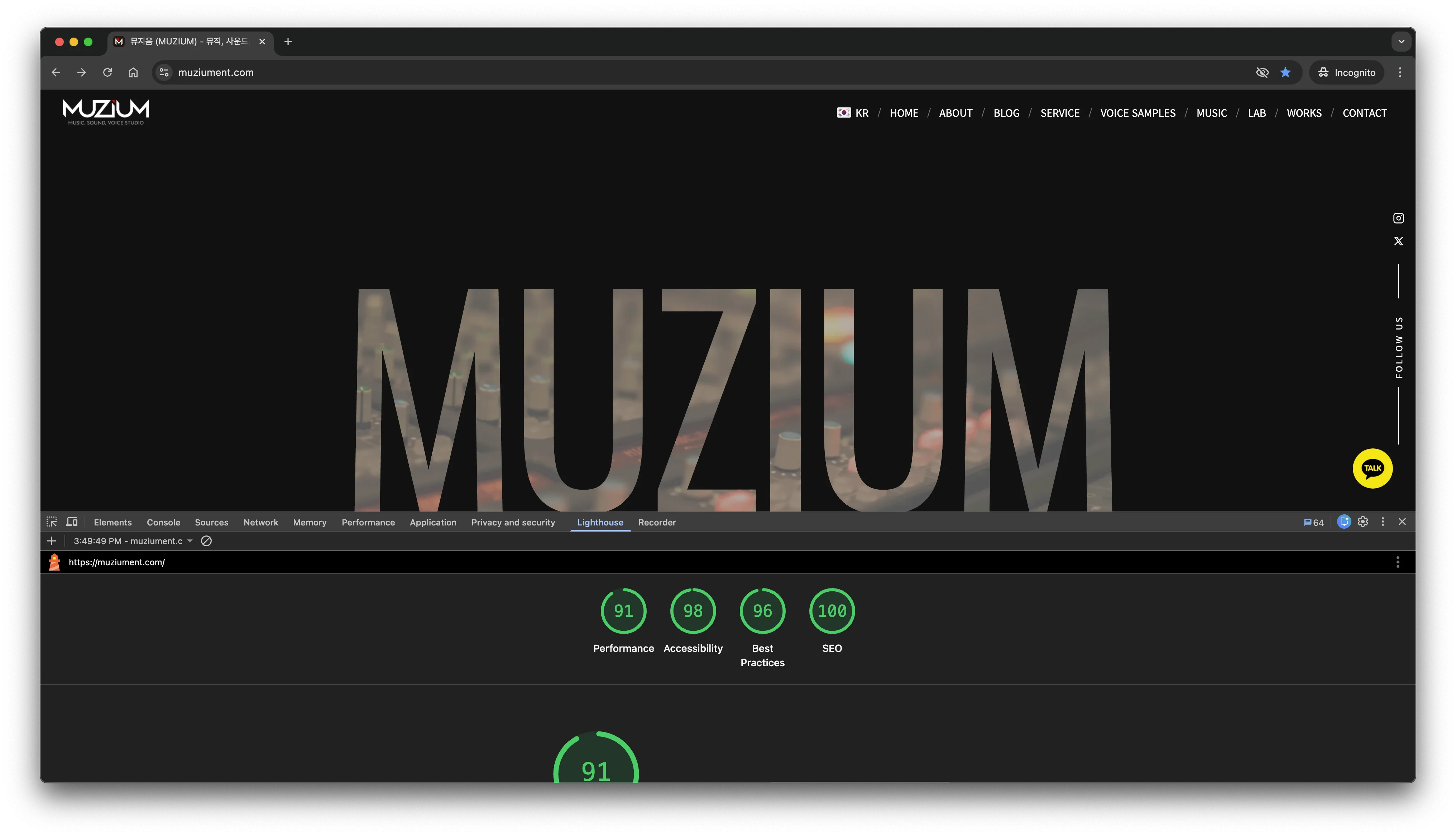
After in-house development: 95+
The results are objectively proven by the Google Lighthouse scores. The Performance score rose from 79 to 91, and most notably, the SEO score jumped from 61 to a perfect 100. What's most encouraging is that through in-house development, we implemented far richer animations and dynamic elements than the previous site, yet the loading speed improved beyond comparison. We also eliminated CLS (Cumulative Layout Shift) — a chronic WordPress ailment — bringing it down to 0, delivering a stable visual experience with no jarring layout jumps.
These technical improvements translate to an immediate sense of smoothness for visitors. With the frustration of waiting for pages to load gone, customers can now focus entirely on our portfolio and content. By achieving the seemingly contradictory goal of "more vibrant yet faster," we've laid the most solid digital foundation for business growth. We're confident that with a now-perfect SEO environment, the value of our studio will reach more potential customers without any friction.
The fact that all of this was accomplished while dramatically reducing hosting costs speaks volumes. The paid theme and plugin subscription fees we used to pay every month and every year are now "₩0." The development process itself was the pinnacle of efficiency. With Vibe Coding, we built a complex architecture and its features in a short period of time. Ultimately, this has become a successful case study of minimizing costs, taking full ownership of the technology, and creating a high-performance website through collaboration between AI and humans.
6. The Freedom of Maintenance
The most stressful thing about using WordPress was "updates." WordPress core updates, theme updates, plugin updates... Everyone has probably experienced clicking a button and watching the entire site break. You had no choice but to update because of security vulnerabilities, yet every time you did, compatibility issues kept you up all night. On top of that, some plugins are subscription-based, meaning once the subscription period expired, you had to pay again just to keep receiving updates.
With a self-developed site, that worry is gone. The ownership of the code belongs entirely to you. As long as you don't modify the code yourself, the site will keep running exactly as it is, forever, without breaking. There's no risk of your site slowing down because an external plugin's server went down.
Of course, making content changes requires opening the code, which can be a bit of a hassle. But even this is solved by Vibe Coding. Tell the AI, "Add a new YouTube video link to the Projects section," and it writes the code for you. Once you get used to it, it's far faster and more intuitive than logging into the WordPress admin panel and navigating through menus to find what you need.
7. Conclusion: Technology Is Just a Tool — Focus on What Matters
WordPress is still an excellent tool. For content-heavy sites that publish blogs or news daily, WordPress may well be the right answer. But for sites where branding, portfolio, and performance are paramount — like a sound studio — and for those looking to reduce maintenance costs, it's time to shed the weight.
Vibe Coding is the most powerful key to making that escape. We no longer need to hire developers or outsource projects; with AI as a brilliant assistant, we can turn the website we imagine into reality. What matters is not "coding skills," but a "clear plan" for what kind of website you want to create.
Now it's your turn. Are you sighing every month when you see your hosting bill? Or are you losing customers because of a painfully slow site? Open your editor right now and start talking to an AI. Building your own lightweight, powerful home on the web — it's not as hard as you think.
💡 Pro Tip: Don't try to build a perfect site from day one. Start with just a single "landing page." Once you finish that one page with AI, you'll gain the confidence to know you can build an entire site.