

Spatial Audio and 3D Sound Design: The Technology Behind Breakthrough Immersion
2026.06.22·Study·21 min readMUZIUM
Also available in:
English···

Why does the same scene have some sounds that burrow into your head?
Have you ever watched the same film scene or the same game cutscene and felt that some sounds were trapped within the screen, while others wrapped around the entire room and whispered from behind you? You wore the same headphones and watched the same footage, but one version sounded like a flat wall while the other seemed to resonate in a 3D space outside your head. This difference cannot be explained by headphone price or bitrate alone.
Many sound designers, game audio programmers, and video creators get stuck at exactly this point. It's common to write down "spatial audio applied" only to find, upon listening, that the result is merely a slightly wider stereo image. As terms like object-based mixing, Ambisonics, and binaural rendering get jumbled together, even the criteria for deciding what to use when become blurred.
This article provides judgment criteria that allow you to confidently write that one line, "spatial audio applied." By covering the principles of how humans perceive direction and distance, the criteria for choosing among key technical axes, and the points where real workflows tend to break down, it will help you tailor your mix along three axes: localization, distance, and externalization.
What Exactly Makes Spatial Audio Different: The Decisive Distinction from Mono, Stereo, and Surround
The Mechanism of Hearing: ITD, ILD, and Pinna Reflections
The reason humans can pinpoint the direction of a sound even with eyes closed is that we have two ears. More precisely, it's because the brain interprets the minute differences between the sound arriving at each ear. These differences fall into two main categories. ITD (Interaural Time Difference) is the time difference between when sound reaches the left and right ears. When someone claps on your right, it reaches your right ear first and arrives at your left ear about 0.6 milliseconds (around 600 microseconds) later, after traveling around your head. ILD (Interaural Level Difference) refers to the volume difference caused by the head blocking sound waves. The shorter the wavelength (i.e., higher the frequency), the more it gets blocked by the head.
On top of this, the curves of the pinna (outer ear) and shoulder reflections imprint subtle frequency shading on the sound. Even the same sound produces different frequency responses depending on whether it comes from above or below as it passes through the pinna, and the brain compares this pattern against its learned database to estimate location. This is the principle behind HRTF.
This is why a typical stereo mix can only provide left-right width but cannot create front-back or up-down dimensionality. Left-right panning only mimics ILD; it doesn't reproduce ITD or pinna reflections. As a result, when listening through headphones, the in-head localization phenomenon occurs, where sound seems to ring "inside the head." The biggest effect that spatial audio aims for is pushing this sound outside the head — what we call externalization.
💡 Practical tip: When you want to quickly self-check whether your mix is "trapped inside your head," close your eyes and point with your finger to where the sound is coming from. If your finger points inside your ear, externalization is weak; if you can stably point to a spot outside your head, externalization is alive. However, since externalization is heavily affected by HRTF fit and headphone calibration, it's better to repeat this check across multiple listeners and headphones whenever possible.
Channel-based, Object-based, Scene-based: Comparing the Three Paradigms
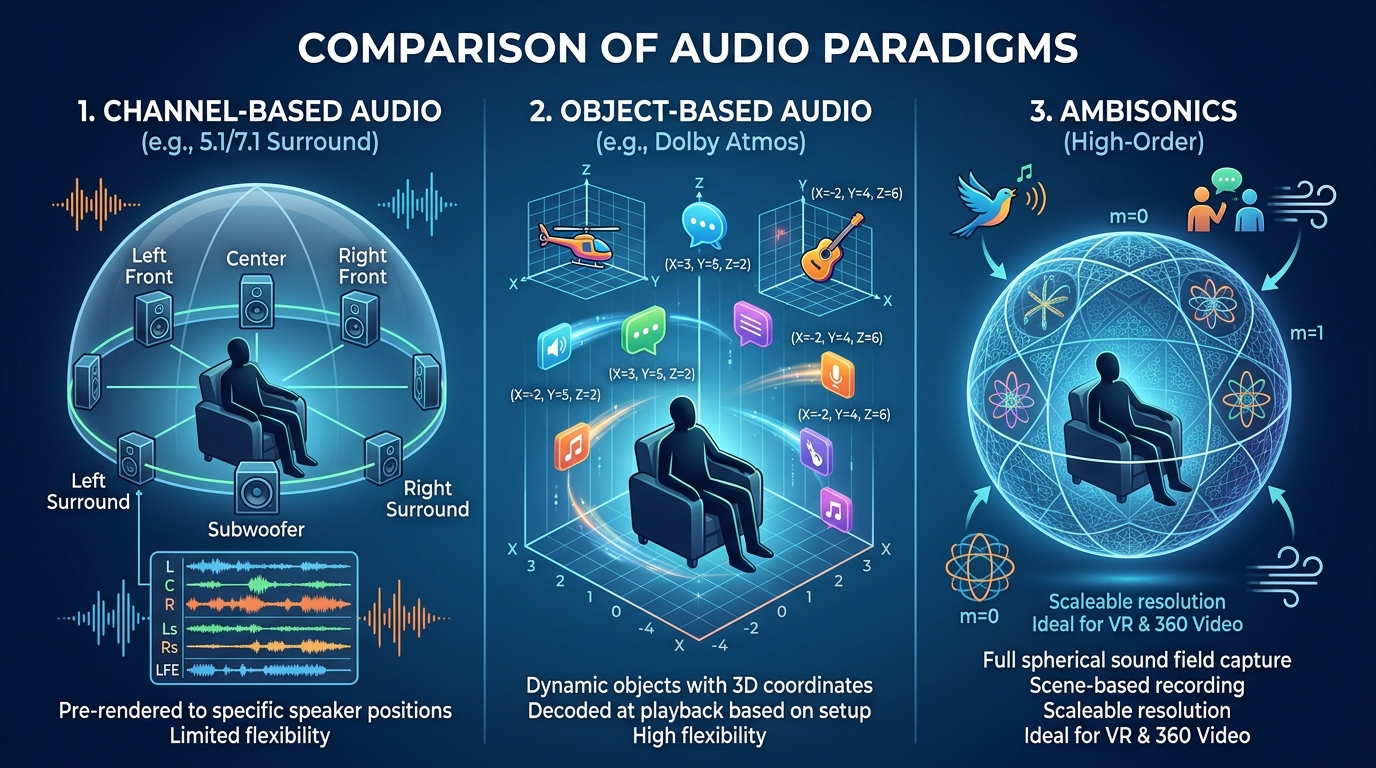
One of the most common misconceptions when dealing with spatial audio is the idea that "more speakers means spatial audio." Traditional surround systems like 5.1 and 7.1 belong to channel-based systems. The sound designer assigns signals directly to each speaker channel, and the listener's playback environment must also follow that channel count and arrangement. The more the intended channel layout diverges from the actual playback environment, the more localization and balance shift.
In contrast, object-based systems treat sound as "audio object + metadata." By storing information like "this footstep is at 3D coordinates (x, y, z)," the playback stage allows a Dolby Atmos decoder or game engine to render in real time according to the listener's speaker or headphone configuration. This is why the same master can play back close to the intended result in a 7.1.4 cinema, on a soundbar, or through headphones. Dolby Atmos and DTS:X are representative implementations of this approach.
Scene-based encodes the entire soundfield using spherical harmonic functions, and Ambisonics falls into this category. First-order Ambisonics (B-format) represents an omnidirectional soundfield with four channels: W, X, Y, and Z. The biggest advantage is rotation. When the listener turns their head in a VR headset, you only need to rotate the soundfield itself, making it well-suited for 360 video or VR environments.
The Three Pillars That Determine Immersion: Localization, Distance, Externalization
When evaluating the quality of spatial audio, people often use vague expressions like "wide" or "enveloping," but in reality this breaks down into three measurable factors. The first is localization. You should be able to pinpoint which direction a sound is coming from. In a game, the criterion is whether key cue sounds, such as the direction of a threat, can be stably distinguished within intended directional groups like front, back, left, right, up, and down.
The second is distance. You should be able to distinguish whether the same footstep is happening 1 meter ahead or at the end of a 20-meter corridor. Distance isn't created merely by reducing volume. The brain estimates distance through the combined action of direct-to-reverberant ratio (D/R ratio), high-frequency attenuation, and the pattern of early reflections.
The third is the externalization mentioned earlier. It refers to the degree to which sound heard through headphones feels as if it exists in space outside the head. If externalization is weak, even accurate localization breaks immersion. In a game, if an enemy sounds like they're "inside your left ear," it's hard to react intuitively even with positional information.
A frequent pitfall is lumping these three together when evaluating. If feedback comes in saying "the spatial feel is lacking" and you can't distinguish whether localization is weak, distance feels flat, or externalization has collapsed, you'll end up fixing the wrong thing.
💡 Practical tip: When reviewing a mix, divide your checklist into three columns. The first column is localization (directional accuracy), the second is distance (near/far), and the third is externalization (is it outside the head). Listening to one scene and rating each column from 1 to 5 makes it clear where you need to focus.
Binaural, Ambisonics, HRTF: Three Technical Axes Engineers Must Distinguish
Binaural: Capturing and Reproducing What Two Ears Hear
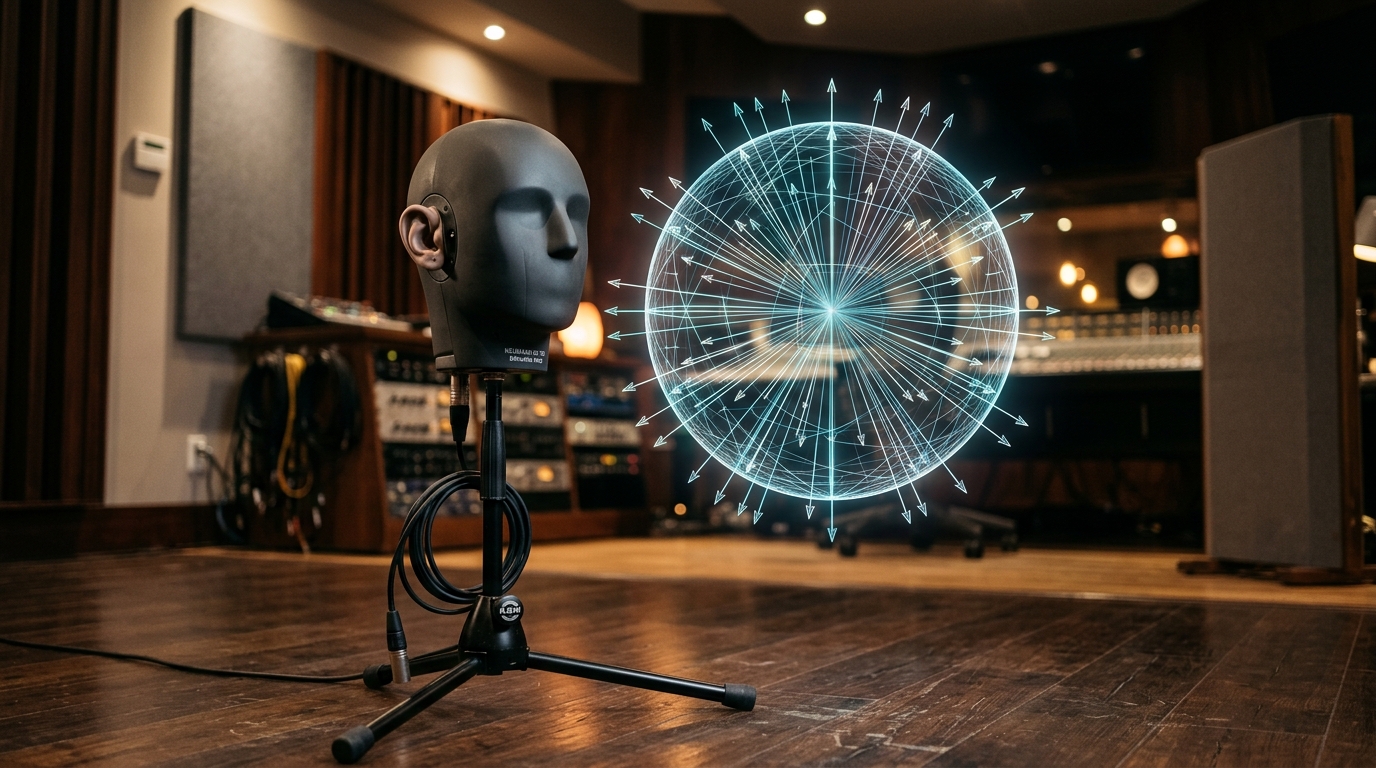
Binaural is the most intuitive spatial audio technology. A representative example is the Neumann KU 100, a dummy head microphone that precisely reproduces the structure of a human head and torso, while the 3Dio Free Space is a binaural microphone with silicone ear models placed at either end without a head-shaped form. Both methods use two channels, but unlike simple stereo, they capture ITD, ILD, and pinna reflection information together. When played through headphones, they produce an externalization effect as if you were standing in that location yourself.
Binaural technology enables expressions impossible with ordinary stereo, such as a voice whispering near your ear or footsteps approaching from behind. That's why it has become a key tool for atmosphere-building in ASMR content production and in VR videos or 360 documentaries.
That said, the limitations are also clear. First, it assumes headphone playback. When played through speakers, the effect collapses due to crosstalk, where both channels reach both ears. Second, if the pinna shape of the dummy head differs from the listener's own ears, localization accuracy drops. Third, once recorded, it's difficult to rotate the soundfield or remix on a per-object basis. So binaural is closer to "captured spatial audio" and is better suited to linear content than to interactive environments.
💡 Practical tip: If binaural recording is difficult, you can achieve a similar effect by applying a binaural panning plugin (Dear Reality dearVR, IEM Plug-in Suite, etc.) to a mono source. However, remember that if the applied HRTF doesn't match the listener, localization can become ambiguous.
Ambisonics: A Rotatable Spherical Soundfield
The decisive difference of Ambisonics is that it treats the soundfield in units of a "sphere" rather than channels. First-Order Ambisonics (FOA) encodes an omnidirectional soundfield with four channels: W (omnidirectional pressure), X (front-back), Y (left-right), and Z (up-down). As you move to Higher-Order Ambisonics (HOA), resolution increases, and the channel count grows as (N+1)², so third-order HOA uses 16 channels.
The biggest strength is rotatability. When a user in a VR headset turns their head 90 degrees to the left, you only need to apply a matrix operation that rotates the entire Ambisonics soundfield 90 degrees in the opposite direction. This is much lighter than recalculating all object coordinates in an object-based system. The reason YouTube's 360 video supports first-order Ambisonics (AmbiX format, ACN/SN3D) is also because of this rotational efficiency.
The limitation, on the other hand, lies in resolution. First-order Ambisonics has coarse localization resolution, so it can express "somewhere on the left" but has trouble clearly pinpointing narrow angles. In interactive environments like games, where you need to indicate an enemy's exact position, it's common to use it alongside object-based methods. Also, Ambisonics itself is not a playback format but an intermediate representation, so it must ultimately go through binaural decoding or speaker array decoding. In practice, IEM Plug-in Suite's BinauralDecoder, the ambix plugin package for Reaper, or a game engine's Ambisonics decoder module are frequently used.
HRTF: The Secret of Externalization and the Personalization Flow
HRTF expresses, as a function, the frequency response of a sound coming from a specific direction as it travels through the pinna, head, and shoulders to reach the eardrum. If you measure HRTFs for all directions, you can convolve any mono source with the HRTF for a given direction to make it sound as if it's coming from that direction. This is the mathematical foundation of binaural rendering.
The problem is that HRTF differs from person to person. Pinna shape, head size, and shoulder width all have an impact. That's why binaural rendering made with an average HRTF feels strongly externalized to some people, but trapped inside the head to others. In particular, front-back confusion — mistaking sound coming from the front for sound coming from behind — frequently occurs with generic HRTFs.
To overcome this limitation, personalized HRTFs have begun appearing in commercial products. Since iOS 16, Apple has offered a feature that uses the TrueDepth camera to scan facial and ear shapes and generate a personalized spatial audio profile. Sony 360 Reality Audio also optimizes HRTFs by capturing photos of both ears through a dedicated headphone app. In the game and VR sphere, Steam Audio supports loading custom HRTFs directly through SOFA (Spatially Oriented Format for Acoustics) files, the standard specification. By contrast, Meta XR Audio SDK (formerly the Oculus Audio SDK lineage) does not — within the publicly documented scope — appear to support a workflow for loading user SOFA files directly like Steam Audio does, and instead uses generic/fixed HRTF-based rendering.
💡 Practical tip: When rendering your content in binaural, don't validate with only one HRTF. By alternating between at least 2–3 representative HRTF datasets (e.g., MIT KEMAR, IRCAM Listen, CIPIC) and checking where front-back confusion tends to occur more, you can create a more robust mix.
The criteria for choosing a technology can be summarized in one line. If you want to faithfully reproduce a captured real space through headphones, use binaural recording; if you need a rotatable 360 soundfield, use Ambisonics; if you want to interactively manipulate positions on a per-object basis, use object-based + HRTF rendering. In real projects, the three are mixed together.
How It's Actually Used in VR, AAA Games, and Video: Production Workflows and Cases
Game Engine Integration: The Division of Labor Among Wwise, FMOD, and Steam Audio
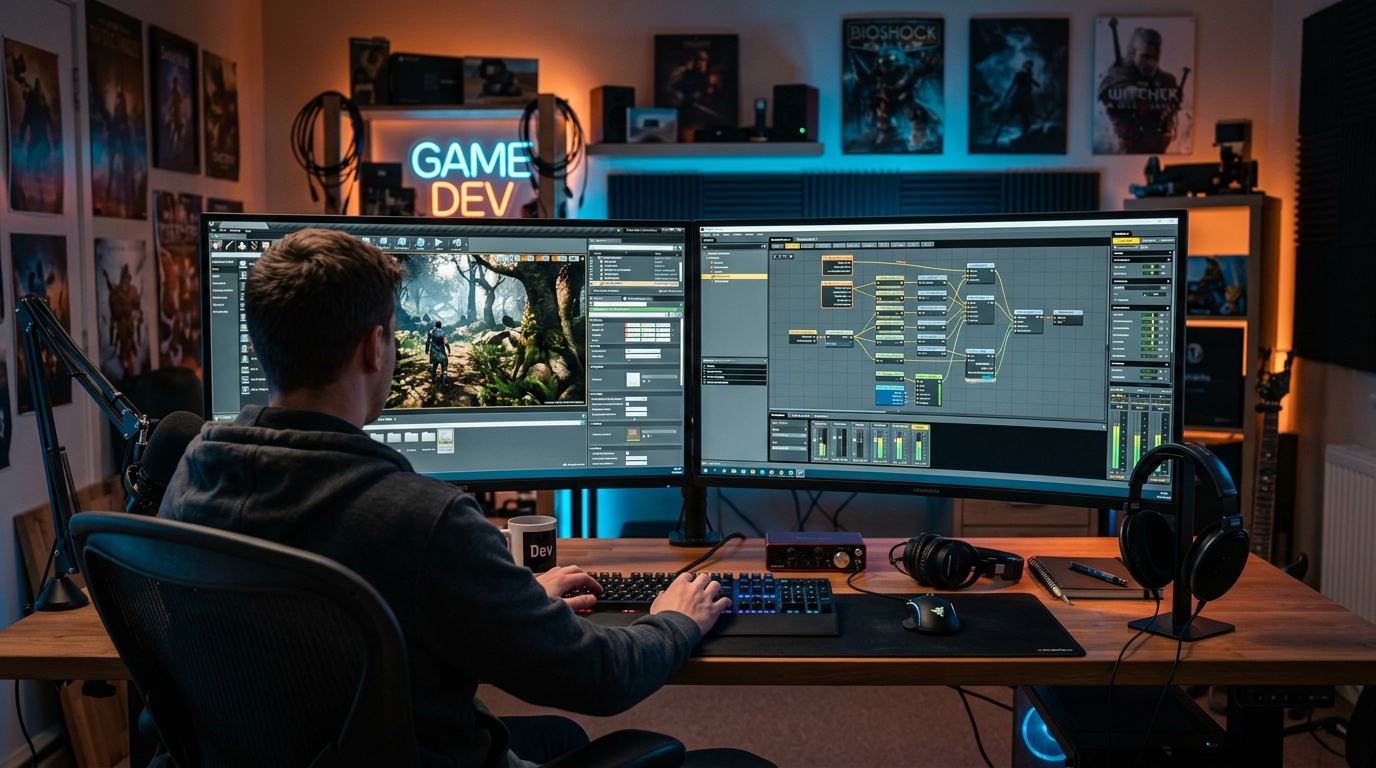
For spatial audio to work in a game, two things have to mesh. One is the assets the sound designer creates (source sounds, attributes), and the other is the engine that renders those assets at runtime according to the listener's position and environment. The middleware responsible for this runtime processing is Audiokinetic Wwise and FMOD Studio. Both tools provide basic spatial processing features such as 3D panning, distance attenuation, Doppler, and environmental reverb, and depending on platform, plugin, and renderer configuration, they can also integrate with Dolby Atmos-family workflows.
When you want to layer on more sophisticated physics-based processing, you combine dedicated spatializers like Valve's Steam Audio or Meta XR Audio SDK. Steam Audio analyzes scene geometry to simulate occlusion (sound being blocked by walls), transmission (attenuation after passing through walls), and real-time reverb in a way that approaches ray tracing. This is a different approach from simply applying "the reverb preset for this room."
Unreal Engine 5 has reinforced built-in spatialization alongside its MetaSounds procedural sound graph system, while Unity integrates third-party spatializers as plugins through the Audio Spatializer SDK. Whichever engine you use, the core is the same: you attach 3D positional metadata to a sound source and render it every frame relative to the listener (usually the camera or the character's head).
Among publicly documented cases, one frequently cited is Ninja Theory's 'Hellblade: Senua's Sacrifice.' To express the protagonist's auditory hallucinations, the team adopted binaural rendering (3Dio-based) as the core audio pipeline, achieving an effect where voices seem to whisper as they rotate around the head when wearing headphones. Beyond this, many AAA stealth and action games have actively leveraged 3D positioning and environmental processing to strengthen positional cues from footsteps and ambient sounds.
Video and VR: From Atmos Music to Vision Pro
On the video side, entry paths into spatial audio split into two branches. One is cinematic mixes for film and TV; the other is 360 video and VR content. On the cinematic side, Dolby Atmos has become a de facto standard. By linking Avid Pro Tools with the Dolby Atmos Renderer, you can assign objects or bed channels per track, mix in a 7.1.4 monitoring environment (7 planar channels + 1 LFE + 4 ceiling channels), and export as an Atmos master (ADM BWF file). The same master is automatically downmixed or binaurally rendered for soundbars, AV receivers, and headphones.
Atmos adoption has also expanded into music. Apple Music and Amazon Music offer Dolby Atmos catalogs, and with supported devices and settings, you can listen to spatial audio combined with dynamic head tracking on certain earphones and headphones. However, unlike video, music Atmos mixes have an aesthetic of "surrounding the audience" that is directly tied to artistic merit, so this remains an area of divided opinion.
In VR and 360 video production, one tool that was once widely used was Facebook's (now Meta's) Spatial Workstation, after which workflows such as Google Resonance Audio and YouTube's combination of first-order Ambisonics + head-locked stereo have coexisted. With the arrival of the Apple Vision Pro, a pipeline that treats spatial video and spatial audio as a single bundle has been emphasized, and combined with head-tracking-based spatial audio offered on devices like AirPods Pro, video content creators have gained a new validation environment.
💡 Practical tip: When reviewing an Atmos mix, always check downmix compatibility. Most users will ultimately listen in various environments such as stereo, TV speakers, soundbars, and ordinary headphones. You can only certify a master after verifying that the result of "Re-render to 2.0" in the Renderer plays back without phase issues or buried vocals.
Step-by-Step Production Workflow and Points to Watch
Spatial audio production can generally be organized into four stages.
Stage 1: Source Recording or Synthesis. For sounds requiring precise single-object localization, a mono source is safe. On the other hand, for background ambience or broad environmental sounds, separately processing stereo or Ambisonics sources for their intended purpose can create richer spatial feel. However, if you pass an already-stereo-encoded source through a binaural panner, phase conflicts can blur localization, so you should check for duplicate panner application and inspect phase after mono summing. For dedicated ambient recording, Ambisonics microphones like the Sennheiser AMBEO VR Mic or RØDE NT-SF1, or the use of impulse responses, are common.
Stage 2: Assigning Spatial Metadata. For games, you set the engine's 3D position coordinates; for video, you set Atmos object coordinates or directional values in the Ambisonics encoder. A frequent problem at this stage is moving coordinates too often and too far. If the listener's brain can't keep up, positional information loses meaning and only fatigue remains. It's also better to prioritize localization for one or two of the most important sources in a scene (the protagonist's footsteps, an enemy's threat sound, etc.) and leave the rest slightly blurred. If you try to localize all sounds equally sharply, the listener's attention scatters, which actually breaks immersion.
Stage 3: Rendering and Monitoring. Convert to your target: binaural rendering, speaker array rendering, Atmos object rendering, etc. At this point, you must absolutely cross-verify across playback environments. Mixes that were perfect in a 7.1.4 studio often collapse on headphones.
Stage 4: Compatibility Verification. Listen on representative devices ranging from headphones, soundbars, and TV speakers to Bluetooth earphones. Mono compatibility in particular is a frequently forgotten area. In an object-based mix, if two objects are positioned symmetrically on the left and right, mono downmix can cause phase cancellation that reduces volume.
Let's point out some errors that frequently occur during production. First, excessive reverb. If you pile on reverb to convey distance, externalization may strengthen, but localization collapses. Second, phase issues. If you play the same mono source simultaneously from two locations in a binaural panner, comb filtering occurs due to subtle delay differences. Third, monitoring environment mismatch. Verifying with only one headphone biases your mix toward that headphone's frequency response.
Pitfalls That Break Immersion and an Immediately Applicable Checklist
Pitfalls in the Mixing Stage: Phase, EQ, LFE, Monitoring
The first cause of a spatial audio mix collapsing is almost always phase. When you send the same signal to two channels with a slight time difference, specific frequencies get emphasized or canceled in a comb filter effect. An ITD intentionally created by a binaural panner is no problem, but unintended delays slip in and make localization ambiguous, weakening externalization. At the check stage, if there's a section where the volume drops sharply when all tracks are summed to mono, you should suspect a phase issue.
EQ also often trips people up. Since HRTFs are essentially pattern functions in the frequency domain, if you aggressively cut high frequencies (especially 4–10 kHz), pinna cues disappear and up-down localization collapses. Conversely, excessive boost in the low end (below 80 Hz) can feel like head vibration in headphones and break externalization. EQ for spatial audio is safest when handled more narrowly and conservatively than usual.
The LFE (low-frequency effects) channel requires separate attention. In an object-based mix, low end that needs positional cues should be included in the corresponding object or main channel, and LFE should be used sparingly only when dedicated low-frequency effects are needed — this gives better compatibility. That's because LFE is a channel with no positional information.
Last is the monitoring environment. Checking with only one headphone ties you to that headphone's frequency response, while checking only in a speaker environment means you miss the headphone user's experience. At minimum, you should cross-use one open-back headphone, one closed-back, and where possible a 7.1.4 speaker environment.
💡 Practical tip: Add a "bad environment" test as the final step of your mix check. By confirming how far localization and clarity survive in environments where ordinary users actually listen — laptop built-in speakers, cheap Bluetooth earphones — you can judge the robustness of your master.
Device and Platform Compatibility: How to Avoid "Fake Spatial Audio"
Not all "spatial audio" labels on streaming services guarantee the same quality. Some content starts from a genuine object-based Atmos master, but some are stereo masters with only post-processed upmixing applied. Upmix-based audio has ambiguous localization and flat externalization, so from a creator's perspective, it's important to know through which path your master is being distributed.
Mobile and Bluetooth environments are also significant variables. Bluetooth audio codecs include SBC, AAC, aptX, aptX HD, LDAC, and others, each with different maximum bitrates and latency characteristics. Some codecs have low accuracy in left-right channel time synchronization, which can shake ITD-based localization. It's known that for head-tracking-based spatial audio, exceeding roughly tens of milliseconds of end-to-end latency can, depending on content and rotation speed, cause head rotation and soundfield rotation to drift apart in an unnatural way. So in head-tracking environments, it's safer to measure overall latency separately.
You also need to check decoding differences across platforms. Dolby Atmos for Headphones, Windows Sonic, DTS Headphone:X, and Apple Spatial Audio all have similar purposes but use different internal HRTFs and rendering algorithms. The same master sounds different across platforms. In games, OS-level spatialization activated by the user and the game's internal spatializer may be applied twice, sometimes making localization fuzzier instead.
💡 Practical tip: Make a one-page platform compatibility document. Keeping notes like "this master is based on Dolby Atmos Renderer, and sounds slightly closer with AirPods Pro's Personalized Spatial Audio" can reduce confusion when receiving external feedback.
Practical Checklist: The Difference Between Beginners and Experts
Even when using the same tools, the gap between beginner and expert results comes down to the depth of the checklist. A beginner stops checking at "did I turn on the spatial audio plugin?", but an expert goes through all of the following items.
Source Stage
Are sounds that need single-point localization organized as mono sources?
Are sample rate and bit depth consistent across the entire master chain?
Does the noise floor not mask externalization effects?
Spatial Processing Stage
Are key cue sounds stably distinguishable within the intended directional groups (front, back, left, right, up, down)?
Is distance expressed through direct/reverberant ratio, rather than simple volume adjustment alone?
Does the soundfield naturally follow when the listener's head rotates (in head-tracking environments)?
Verification Stage
Did you cross-verify with at least two types of headphones and one type of speakers?
Are there no elements that disappear due to phase cancellation in mono downmix?
Does fatigue not accumulate over continuous listening of 30 minutes or more?
Consider a Before/After scenario. In a VR scene made by a beginner, when an enemy approaches from behind, footsteps only sound "somewhere on the left" and you can't tell the exact position. When an expert remixes the same scene, the footsteps are heard from behind, at a distance of about 3 meters, with the direct sound ratio increasing and high-frequency detail coming alive as the enemy gets closer. The same assets were used, but the gap opens up based on whether the three axes — localization, distance, externalization — were consciously designed.
Finally, one thing to note: listener fatigue. The more strongly spatial audio is applied, the more impressive it is, but if a game or video runs for an hour or two, excessive effects accumulate fatigue. The secret to maintaining long-term immersion is dynamic design — using strong spatial effects at the most important moments and exercising restraint in everyday scenes.
The Fastest Path to Pushing Sound Beyond the Screen
The essence of spatial audio isn't the number of speakers or channels, but the act of consciously designing along three axes: localization, distance, and externalization. Binaural, Ambisonics, and HRTF are each tools for solving different problems, and they're options you choose based on whether you need capture, rotation, or interactivity. And the final sense of immersion is determined by the last stage of the workflow — cross-verification across diverse playback environments.
Let me suggest one small action you can try today. Pick the most important scene from a project you're currently working on and make two versions. One is the version with only stereo panning applied as usual; the other is the same scene rendered with a binaural panner or object-based spatializer. With headphones on and eyes closed, alternate between the two versions and take notes on where localization comes alive and where externalization collapses. Even a single A/B comparison of one scene clearly reveals the points in your mix that need fixing.
Sound creates space. The work of pushing screen-trapped sound outside the screen, into the listener's room, begins not with grand equipment but with a clear sense of the three axes. May this article serve as a solid starting point on your journey to design deeper immersion.